
Automation data reference
Every supported ticket input, requested-transition value and typed action output, with syntax, limits and worked mappings.
On this page
On this page
Read this first
A stage is a ticket status. An automation step is an action node in a chain. Data references read the saved ticket and completed steps in that run; they are not mutable global variables. No reference reads an attachment's contents or executes tests.
Managers configure these values under Workflows → Automation, then open an action's Edit dialog. Choose available entries from the data picker, or type supported references exactly. Apply to workflow draft changes only the draft. Save draft persists it; publication activates the reviewed configuration. The same template syntax does not imply that every action accepts every destination field.
Reference syntax and availability
Use {{ticket.title}}, {{steps.assess.verdict}} or, inside a gate, {{request.reason}}. Replace assess with the producer's actual node ID, not its display name. IDs are case sensitive and contain letters, numbers, underscores or hyphens; begin with a letter and use at most 64 characters.
Only completed upstream outputs guaranteed on the path to this consumer are available. A skipped branch does not provide an output. Unknown properties, forward references and incompatible condition operators fail validation. A valid but missing runtime value stops safely with “Variable unavailable”; null, false, zero and empty arrays are different from missing values. Retries retain completed steps and inference checkpoints.
Every ticket input below is available when that action executes, after earlier committed field updates. It is not an immutable copy of the ticket when the chain first started. Before-transition gates assess saved fields while the old status remains in place, and recheck source versions/evidence before applying the requested move.
Ticket inputs
Names and IDs are different: assignees, labels, types, workflows and stages use stored IDs/values. Templates do not automatically resolve these IDs to display names.
| Reference | Type | Meaning | Empty/limits | Example |
|---|---|---|---|---|
{{ticket.id}} |
text | Stable ticket ID | nonempty | Ticket: {{ticket.id}} |
{{ticket.key}} |
text | Readable ticket key | nonempty | Ticket: {{ticket.key}} |
{{ticket.title}} |
text | Saved title | nonempty; up to 300 characters | Ticket: {{ticket.title}} |
{{ticket.type}} |
text | Ticket-type ID, not its display name | nonempty | Ticket: {{ticket.type}} |
{{ticket.status}} |
text | Current stage ID, not category or display name | nonempty | Ticket: {{ticket.status}} |
{{ticket.project_id}} |
text | Owning project ID | nonempty | Ticket: {{ticket.project_id}} |
{{ticket.workflow_id}} |
text | Assigned workflow ID | nonempty | Ticket: {{ticket.workflow_id}} |
{{ticket.version}} |
number | Current optimistic ticket version | integer | Ticket: {{ticket.version}} |
{{ticket.reporter}} |
user ID | Reporter ID | nonempty | Ticket: {{ticket.reporter}} |
{{ticket.assignee}} |
user ID or null | Assigned user ID | null when unassigned | Ticket: {{ticket.assignee}} |
{{ticket.priority}} |
text | Stored lowest/low/medium/high/critical value | nonempty | Ticket: {{ticket.priority}} |
{{ticket.parent_id}} |
text or null | Explicit parent ticket ID | null without a parent | Ticket: {{ticket.parent_id}} |
{{ticket.sprint_id}} |
text or null | Assigned sprint ID | null without a sprint | Ticket: {{ticket.sprint_id}} |
{{ticket.release_id}} |
text or null | Assigned release ID | null without a release | Ticket: {{ticket.release_id}} |
{{ticket.release_note}} |
text | Plain-text release-note summary | may be empty | Ticket: {{ticket.release_note}} |
{{ticket.points}} |
number or null | Story-point estimate | zero is valid; may be null | Ticket: {{ticket.points}} |
{{ticket.hours}} |
number or null | Original hour estimate | zero is valid; may be null | Ticket: {{ticket.hours}} |
{{ticket.remaining}} |
number or null | Remaining-hour estimate | zero is valid; may be null | Ticket: {{ticket.remaining}} |
{{ticket.due_date}} |
text or null | Saved YYYY-MM-DD date | empty/null when unset | Ticket: {{ticket.due_date}} |
{{ticket.execution_mode}} |
text | human, assisted or agent | stored identifier | Ticket: {{ticket.execution_mode}} |
{{ticket.description}} |
text | Saved Markdown description alias | may be empty | Ticket: {{ticket.description}} |
{{ticket.acceptance}} |
text | Saved Markdown acceptance-criteria alias | may be empty | Ticket: {{ticket.acceptance}} |
{{ticket.data.description}} |
text | Saved Markdown description | same value as description | Ticket: {{ticket.data.description}} |
{{ticket.data.acceptance}} |
text | Saved Markdown acceptance criteria | same value as acceptance | Ticket: {{ticket.data.acceptance}} |
{{ticket.data.labels}} |
collection of IDs | Explicit project label IDs | empty array when none | Ticket: {{ticket.data.labels}} |
Custom ticket fields
Use {{ticket.data.custom.qa_test_plan}} or substitute a configured field ID. Values retain the configured type: text/date/select/user IDs are strings, numbers remain numbers, checkboxes remain booleans and multiselect fields are collections. An unset custom key may be absent rather than null; do not insert it unconditionally without checking that field is populated. False and zero are valid populated values. A user reference does not grant access or notify that person.
The reference validator accepts the custom-field path pattern; it does not guarantee the key exists in the run. Project fields still control destination validation. Text custom fields have a 5,000-character limit. Do not confuse source ticket.data.custom.qa_test_plan with destination custom.qa_test_plan in Update fields.
Requested-transition inputs
These exist only in a Before transition chain. They describe the original request, not a new permission grant.
| Reference | Type | Meaning | Empty/limits | Example |
|---|---|---|---|---|
{{request.from}} |
text | Original source stage ID | Required | From {{request.from}} |
{{request.to}} |
text | Requested target stage ID | Required | To {{request.to}} |
{{request.transition}} |
text | Published transition ID | Required | Check {{request.transition}} |
{{request.reason}} |
text | Original requester’s reason | May be empty unless required | Reason: {{request.reason}} |
There is no requester-profile, arbitrary request-body or external-system object exposed through this namespace.
Step output catalogue
Each table uses the illustrative node ID step. Change it to the real producer ID. Outputs exist only after that action completes successfully. AI collections may be empty unless stated otherwise; rejected/refused/malformed responses do not create valid assessment outputs.
AI evaluation
| Reference | Type | Meaning and limits | Example |
|---|---|---|---|
{{steps.step.verdict}} |
select | pass, fail or insufficient_evidence; Pass needs a supplied source ID | {{steps.step.verdict}} |
{{steps.step.explanation}} |
text | Nonempty assessment, at most 4,000 characters | {{steps.step.explanation}} |
{{steps.step.findings}} |
collection | 0–10 strings, each at most 4,000 characters | {{steps.step.findings|lines}} |
{{steps.step.sources}} |
collection | 0–100 supplied source IDs; Pass requires at least one | {{steps.step.sources|lines}} |
{{steps.step.model}} |
text | Effective provider model ID | {{steps.step.model}} |
AI ticket draft
| Reference | Type | Meaning and limits | Example |
|---|---|---|---|
{{steps.step.title}} |
text | Proposed title; at most 300 characters | {{steps.step.title}} |
{{steps.step.description}} |
text | Proposed Markdown; at most 10,000 characters | {{steps.step.description}} |
{{steps.step.acceptance}} |
text | Proposed acceptance criteria; at most 10,000 characters | {{steps.step.acceptance}} |
{{steps.step.questions}} |
collection | 0–20 strings, each at most 4,000 characters | {{steps.step.questions|lines}} |
{{steps.step.model}} |
text | Effective provider model ID | {{steps.step.model}} |
AI summary
| Reference | Type | Meaning and limits | Example |
|---|---|---|---|
{{steps.step.state}} |
text | Summary; at most 4,000 characters | {{steps.step.state}} |
{{steps.step.decisions}} |
collection | 0–20 strings, each at most 4,000 characters | {{steps.step.decisions|lines}} |
{{steps.step.blockers}} |
collection | 0–20 strings, each at most 4,000 characters | {{steps.step.blockers|lines}} |
{{steps.step.nextSteps}} |
collection | 0–20 strings, each at most 4,000 characters; case-sensitive S | {{steps.step.nextSteps|lines}} |
{{steps.step.sources}} |
collection | 0–100 supplied source IDs | {{steps.step.sources|lines}} |
{{steps.step.model}} |
text | Effective provider model ID | {{steps.step.model}} |
Condition
| Reference | Type | Meaning and limits | Example |
|---|---|---|---|
{{steps.step.matched}} |
checkbox | true when conditions passed; false selects the False branch | {{steps.step.matched}} |
{{steps.step.reasons}} |
collection | Failure messages; empty on a match; inaccessible work stays generic | {{steps.step.reasons|lines}} |
Add comment
| Reference | Type | Meaning and limits | Example |
|---|---|---|---|
{{steps.step.body}} |
text | Posted comment body; 1–10,000 characters | {{steps.step.body}} |
{{steps.step.commentId}} |
text | Stable ID of the idempotently created comment | {{steps.step.commentId}} |
Update fields
| Reference | Type | Meaning and limits | Example |
|---|---|---|---|
{{steps.step.fields}} |
structured | Expanded values requested by this step, not the complete ticket | {{steps.step.fields|json}} |
{{steps.step.ticketVersion}} |
number | Version after the committed field update | {{steps.step.ticketVersion}} |
Transition
| Reference | Type | Meaning and limits | Example |
|---|---|---|---|
{{steps.step.fields}} |
structured | Requested status change, e.g. {"status":"ready"} | {{steps.step.fields|json}} |
{{steps.step.ticketVersion}} |
number | Version returned for the step; see pending-gate limitation below | {{steps.step.ticketVersion}} |
Create from template
| Reference | Type | Meaning and limits | Example |
|---|---|---|---|
{{steps.step.instanceId}} |
text | Created work-template instance ID, not a child ticket ID | {{steps.step.instanceId}} |
Request review
| Reference | Type | Meaning and limits | Example |
|---|---|---|---|
{{steps.step.reviewer}} |
user | Eligible reviewer ID; not a review-completion result | {{steps.step.reviewer}} |
Notify / handoff
| Reference | Type | Meaning and limits | Example |
|---|---|---|---|
{{steps.step.message}} |
text | Expanded message text | {{steps.step.message}} |
{{steps.step.ticket}} |
text | Ticket key, e.g. SAMPLE-28 | {{steps.step.ticket}} |
{{steps.step.nextTransitions}} |
text | Only present for an assignee recipient; otherwise unavailable | {{steps.step.nextTransitions}} |
Approval
Approval publishes no referenceable output properties. Its committed review/checkpoint controls whether the next action may proceed; there is no steps.step.approved property.
Picker and runtime differences
The text-reference validator supports AI model, summary sources, and Notify/handoff nextTransitions, although these are absent from the current output picker. They can be typed in text references; they are not available as typed step-condition choices. Notify nextTransitions is omitted for manager recipients, so inserting it on that path fails rather than producing an empty string.
fields is a structured object. A text reference may address a present member, for example {{steps.move.fields.status}} or {{steps.save.fields.custom.qa_test_plan}}. The generic picker exposes the whole object, not all nested members. Validation accepts a nested fields path without proving that the member will exist; guard the path or use a known configured destination. Typed conditions expose only declared whole output fields, not arbitrary nested properties.
AI sourceDependencies and update/transition pendingGate may appear in operational records but are not supported data references. A transition step waiting for a separate gate does not mean the status is applied; inspect the pending request and final run state. Simulation is illustrative, including proposed changes/version values; it does not prove actual persistence, current provider availability or an AI verdict.
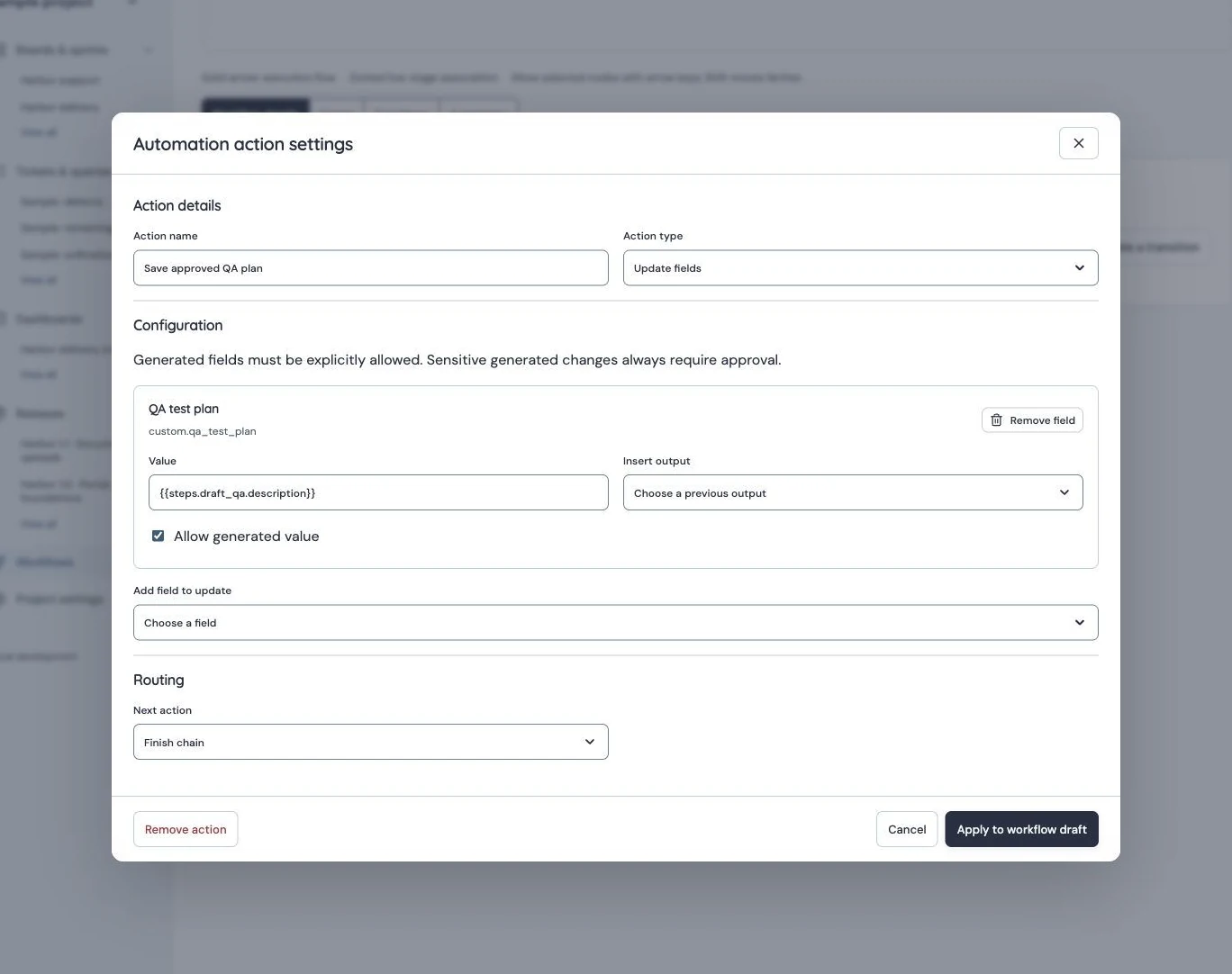
Automation Data Picker
Production mapping explicitly allows the upstream description output for custom.qa_test_plan; it does not overwrite the ticket description. Identity redactions are recorded in the capture manifest.
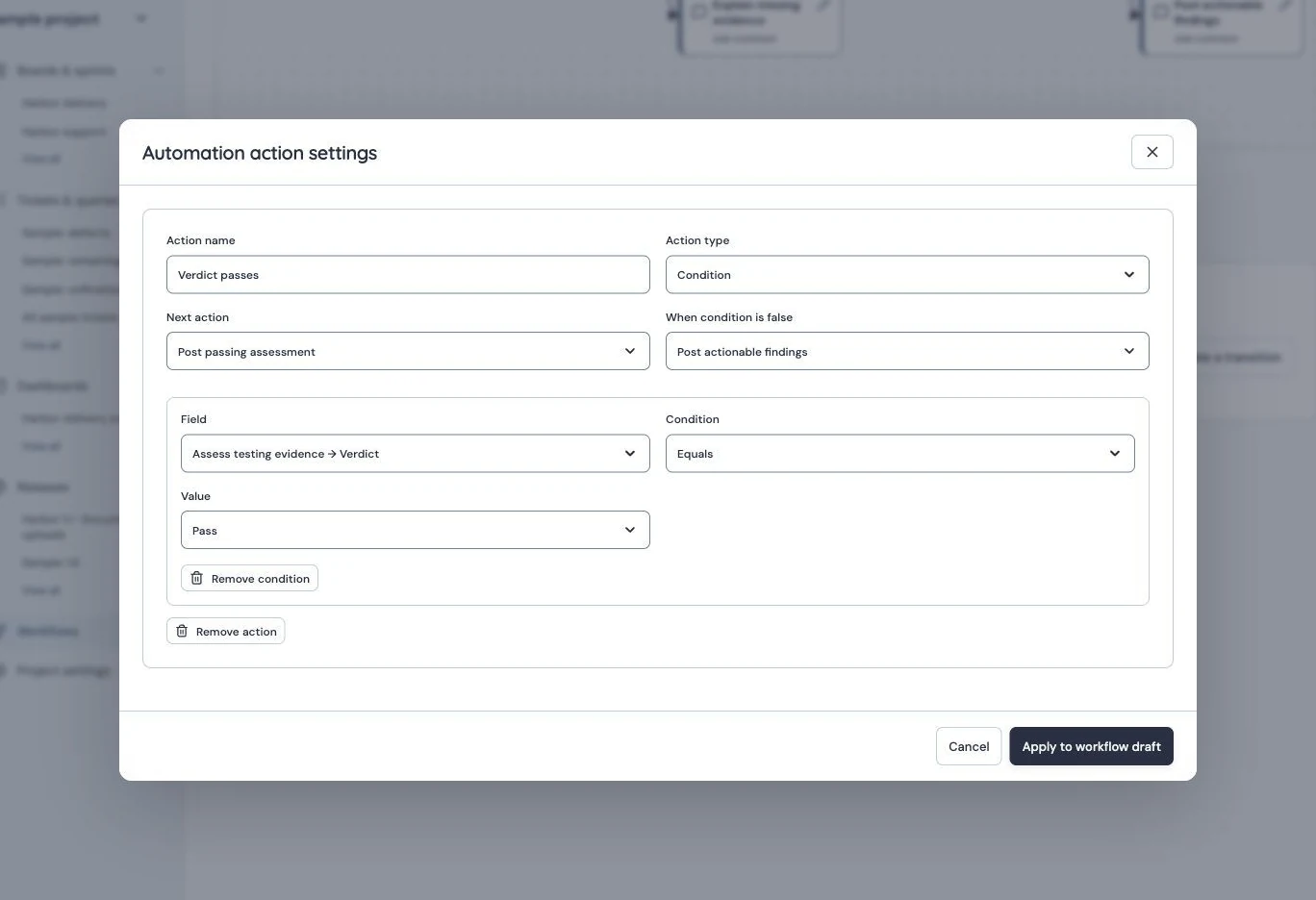
Typed Condition
Production Condition reads the upstream evaluation verdict and branches on Pass, with separate successful and false destinations. Identity redactions are recorded in the capture manifest.
Whole values, text and formatting
A reference occupying an entire value preserves the primitive/collection/object type: "{{steps.check.matched}}" becomes a boolean rather than the string “true”. This matters when a destination expects a boolean or number. Destination fields still enforce their own type, permission and length rules.
In surrounding text, primitive strings are inserted directly; non-string values use JSON representation. For readable lists choose {{steps.assess.findings|lines}}; for explicit JSON choose {{steps.assess.sources|json}}. |lines joins array entries with newlines and is intended for simple values; it is not a table formatter. Both formatted results are bounded to 16,000 characters. The consumer's smaller limit still applies, including comments (10,000), prompts (4,000) and custom text (5,000). Oversized values fail; do not rely on silent truncation.
{{steps.assess.verdict}} uses stored pass, fail or insufficient_evidence. In the condition editor, choose its labelled option. Text checks are case insensitive; reference paths are not. Collection outputs support empty/populated and count comparisons. “Matched = false” is different from an absent output.
Example: evidence → assessment → comment → approval → move
Follow the complete testing-proof guide to create a Before transition chain. Use these node IDs for the example:
requirements: Match all populated evidence fields. False → a literal guidance comment, then end blocked without inference.assess: AI evaluation of selected saved fields and permitted bounded comments/attachment metadata.verdict: comparesteps.assess.verdictwithpass.- True →
pass_note, Add comment using the text below →review, explicit manager Approval →move, Transition to the original requested target. - False →
fail_note, Add comment with the same assessment/findings and requested missing evidence → end blocked.
Proposed testing-proof assessment: {{steps.assess.verdict}}
{{steps.assess.explanation}}
{{steps.assess.findings|lines}}
Supplied source IDs: {{steps.assess.sources|json}}
Assessment of supplied text and file metadata only; attachment contents,
external systems and actual test execution were not inspected.
Post an assessment on both evaluated outcomes. A reference does not create approval or authority. Generated comments cannot create unsolicited mentions or attachment embeds, are attributed to automation and are idempotent per run/step. Changed or inaccessible evidence makes a gate stale; request a deliberate fresh check rather than automatically repeating inference.
Example: QA draft → custom field
The manual QA training guide uses AI Draft ticket content, with the complete proposed plan in its description output. After an explicit Approval action, configure Update fields:
{
  "custom.qa_test_plan": "{{steps.draft_qa.description}}"
}
Explicitly allow custom.qa_test_plan as the generated destination. This saves to QA test plan, not to the ticket description. The AI draft parser permits 10,000 description characters, but this custom text destination accepts only 5,000; instruct the model to stay below 4,000 and expect oversized output to fail safely. The AI node's proposed title/acceptance are ignored unless mapped separately.
Work-template parameters are separate
Work templates declare named inputs such as feature and use {{parameters.feature}} in template content. Automation's Create from template action maps literal text or valid upstream references into those declared parameters. A template instance's parameters are not an extra parameters namespace for arbitrary automation nodes, and instanceId does not expose every created ticket as step outputs.
Troubleshooting and boundaries
- Unknown data reference: choose a documented path; arbitrary model response keys, environment variables, secrets and HTTP headers are not available.
- Outputs must come from earlier actions: move the consumer onto a path where the producer always completes; a branch does not create global state.
- Variable unavailable: check skipped producers, absent custom fields, optional notification output and nested changed-field members. Keep existing saved content; correct the configuration before deliberate retry.
- Wrong type/too long: use the appropriate whole-value reference or explicit list/JSON formatting; respect the consumer's limit.
- Blocked/stale gate: inspect current evidence, requested transition and original actor permissions. A successful provider call alone is not a successful assessment or transition.
This catalogue describes public configuration references. Operational job records, provider attempts and internal snapshots are not an additional supported expression language. No scripts, regular expressions, custom output schemas, external tools or automatic test execution are provided.