
AI automation walkthroughs
Work through reviewed refinement, dependency handoff and template-based epic delivery.
On this page
On this page
Prepare safely
Use the private SAMPLE project and fictional Harbor work. You need project manager rights to configure/publish chains and the appropriate reviewer role to approve. Site AI and project automation must already be enabled for a real run; do not weaken free-only controls to follow this guide.
The sample workflows cover AI-assisted tasks, dependency handoffs and Agent delivery epics. Their existence does not imply their chains are enabled. Inspect current published settings. A simulation proves configuration paths, not model quality or a successful committed run.
Walkthrough 1: reviewed ticket refinement
Use case: refine the portal upload story without silently replacing the team's requirements.
- Open the AI-assisted sample workflow draft and select its manual refinement chain, or create a manual chain for the intended ticket workflow.
- Add AI generate with a ticket-refinement task. Ask for a clear description, acceptance criteria and unanswered questions based on the ticket; prohibit inventing decisions.
- Add a field update using the prior-output picker for description and acceptance. Keep the ticket in AI-assisted mode so generated edits require review.
- Simulate with the upload ticket and check references. Save/publish only after validating the chain.
- Start the manual chain from the ticket's automation controls. Inspect the generated artifact and pending approval.
- Compare the proposal with the current description, correct unsupported assumptions through the available review flow, and approve only the intended change.
- Inspect the updated fields and history after completion.
For a stale-approval exercise, add a relevant comment before approving an old proposal. Expect freshness validation to reject it. Retry to produce a new proposal and review again. Do not assume a previous approval covers new source content.
Walkthrough 2: dependency handoff
Use case: notify the upload owner after its validation prerequisite finishes, without automatically taking ownership or moving status.
- Record the validation ticket as a blocker of the upload ticket.
- Configure a blockers-resolved chain on the upload workflow.
- Start with a Condition that checks the target is unfinished. Route the false branch to the end.
- On the true branch add an AI summary, followed by Notify/handoff using the summary's supported output.
- Simulate while the blocker is unresolved, then inspect the path after resolving it.
- For a real run, enable/publish deliberately and resolve the fictional prerequisite. Inspect the run and the intended recipient's eligible notification.
The handoff informs the next owner. It does not inherently transition the target, assign a different person or deploy anything. Reopening the blocker before unfinished actions commit can pause the run because related state is rechecked.
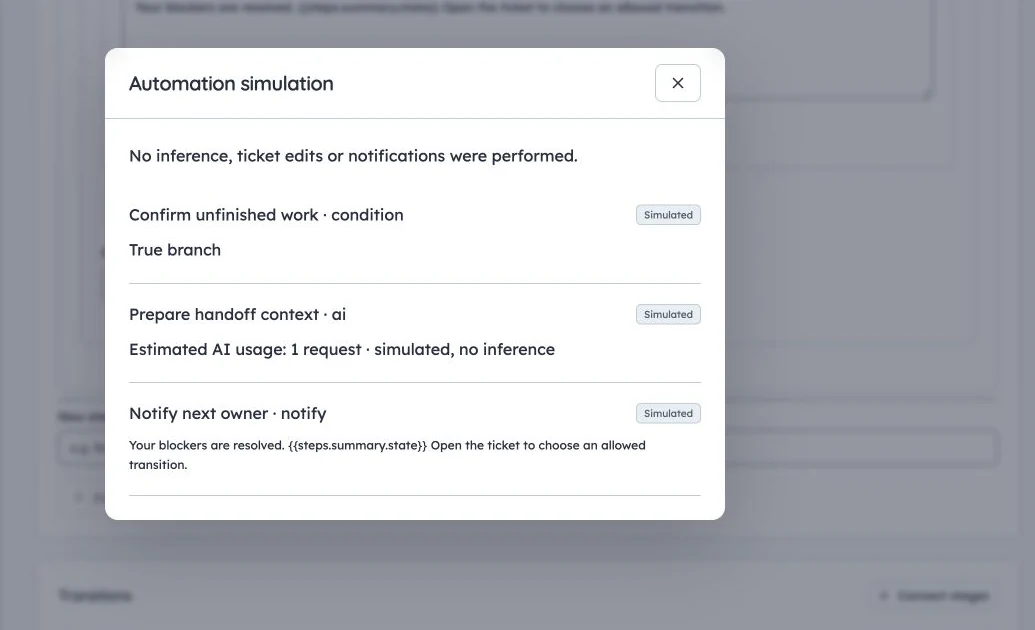
Dependency handoff simulation
Production simulation for SAMPLE-26: no inference, ticket edits or notifications were performed.
Walkthrough 3: epic delivery from a template
Use case: turn a reviewed Harbor feature brief into consistent child work.
- Publish a Feature delivery template with a compatible epic root and implementation/test/review children. Define the feature parameter and owner slots.
- In the epic workflow, use AI generate for a proposed brief/criteria. Connect an explicit Approval node for the project manager.
- Add Create from template, pin the reviewed template and map the current epic as its existing root where supported.
- Map the feature parameter from a validated upstream output and assign slots to eligible people.
- Add a final owner notification, then simulate and inspect the complete configuration before publishing.
- Start a real run only when enabled controls permit it. Review the proposal, approve the exact frozen work and inspect instantiation progress.
- Verify children, dependencies and mapped ownership, then inspect the final notification/run history.
Agent mode permits only the configured eligible outputs; explicit approval still pauses. Template creation and protected generated changes remain subject to their approvals and rights. If a step fails after creating some children, retry/resume the recorded operation; cancellation does not roll back those tickets.
Verify and troubleshoot
- Nothing starts: check trigger, published enabled chain, ticket workflow assignment, project/site enablement and mode assumptions.
- Source unavailable: check the publisher's current rights and referenced template/model/recipient access.
- Awaiting approval: inspect explicit versus implicit reviewer eligibility and whether the proposal is stale.
- Budget-blocked: inspect existing shared limits; wait/reset or retry after resolution, without enabling paid inference.
- Partial work: inspect committed steps before retrying; use the saved instantiation/run instead of duplicating it.
Production examples and any simulation captures are labelled in screenshot captions. A documented path is not a promise that every model or budget is currently available.