
AI assistance and review
Use AI to find work, improve drafts, catch up and prepare release notes without losing control of saved content.
On this page
On this page
Availability and permissions
AI is optional and administrator controlled. If unavailable, ordinary filters, ticket editing, template release notes and workflows remain usable. Managers select among enabled models where a feature offers a model choice. No action upgrades billing or substitutes an unapproved model.
Requests use bounded context and validated output. Ticket text and custom prompts are untrusted input, not authority to change application permissions. Review generated facts, references and wording before applying or saving.
Ask AI for a filter
In Tickets & queries, expand Filters and select Ask AI. Describe the desired accessible work, for example “unfinished Harbor defects with remaining hours.” Review the proposed query, explanation and any clarification. Apply filter runs the reviewed filter; an unsupported query is rejected rather than executed as arbitrary JQL or SQL.
Check status identifiers and project scope. currentUser() resolves for the viewer. A generated filter cannot reveal tickets outside memberships, but an overly broad valid filter may still be the wrong question.
Draft and improve a ticket
Use Draft with AI or Improve draft from the ticket form. Supply the feature/problem and the context actually needed. Review title, description, acceptance criteria and unanswered questions.
Applying fills a form draft; saving is still required. Assistance does not choose owners, estimates or dates for you. Keep unrelated unsaved fields intact. A stale request or changed source requires a fresh review rather than silently replacing newer content.
For Harbor: ask for acceptance criteria for retrying a document upload after a transient failure. Verify that the output covers retained file selection, retry feedback and keyboard access; remove invented guarantees about infrastructure or customer data.
Catch up on a ticket
Open Catch up for a summary since the previous visit or the recent week. Review current state, decisions, blockers and suggested next steps. Follow source activity links rather than accepting the narrative as a complete audit record.
Coverage is bounded. A truncated/partial-history indication means the model did not see everything. New comments, links or edits can invalidate source freshness; request a fresh summary when necessary.
Draft release notes
Follow release notes: select tickets, review inclusion counts, choose AI if available, inspect the draft and save explicitly. Only selected release metadata and ticket keys/types/titles/release-note summaries are supplied; comments, attachments and identity/profile fields are excluded from that feature's input.
Template generation remains the fallback for oversized selections, unavailable models, timeouts or budget exhaustion. AI does not publish a GitHub release, announce a launch or expose the notes publicly.
Budget and failure handling
All AI features share configured site limits, including release notes and workflow nodes. The Cloudflare free allowance is shared with other account usage; Nearer's own reservations are not a provider-wide remaining balance. Generated filter values use exact identifiers or unambiguous display names. If a status, person or other categorical value is ambiguous or unavailable, the proposal asks for clarification instead of silently producing an empty search. Manual historical queries keep their existing behaviour. See AI administration.
If a model fails or output is malformed, preserve the existing saved content and draft. Correct the input or retry after the cause is resolved. Do not broaden data access or enable paid inference to make an example succeed.
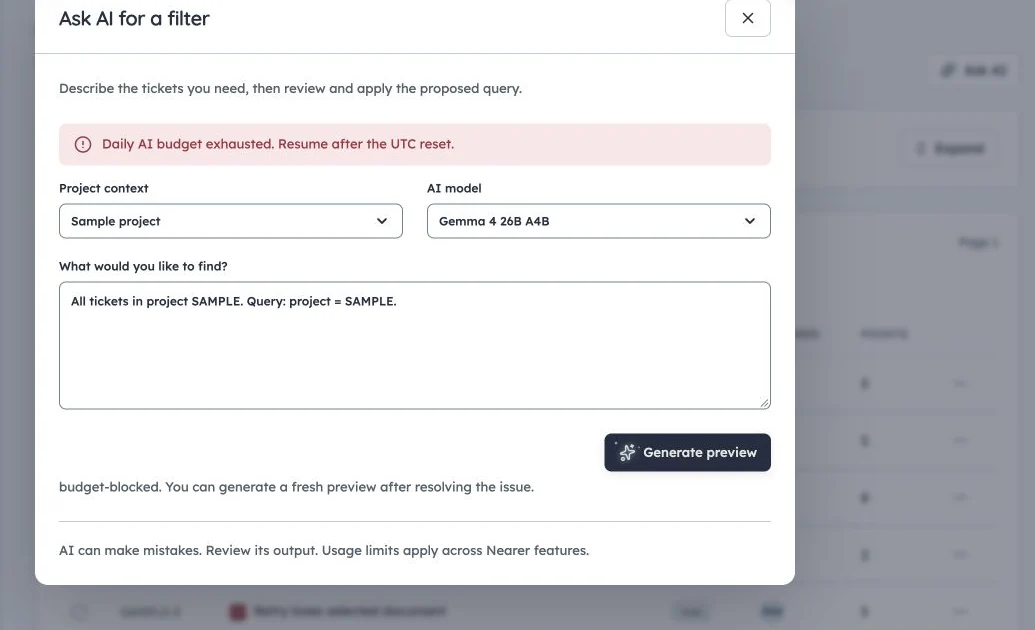
AI budget feedback
Real production request stopped by the existing daily AI budget after provider timeout/retry. No limit or paid service was enabled.
The production capture shows an actual budget-blocked request after provider timeout/retry during documentation preparation. It is not a generated proposal. Existing limits were retained; configuration and simulation walkthroughs remain usable without further inference.
AI in workflows
Interactive assistance prepares drafts. Workflow chains add event triggers, explicit actions and approvals under separately published configuration. Execution modes and current publisher rights determine whether a generated proposal may apply unattended. Continue with automation concepts before enabling a chain.