
Queries and saved searches
Build equivalent visual/text filters, save searches and understand the supported query language.
On this page
On this page
Open and run a query
Open Tickets & queries. The panel starts collapsed: its snippet describes the executed search, or All accessible tickets for a blank search. Expand to use Query text, Visual builder or Saved searches.
Edits remain unapplied until Search. “Unapplied changes” means the editor differs from the displayed results. Collapsing retains the draft and continues to describe the executed query. An empty query does not add an assignee filter.
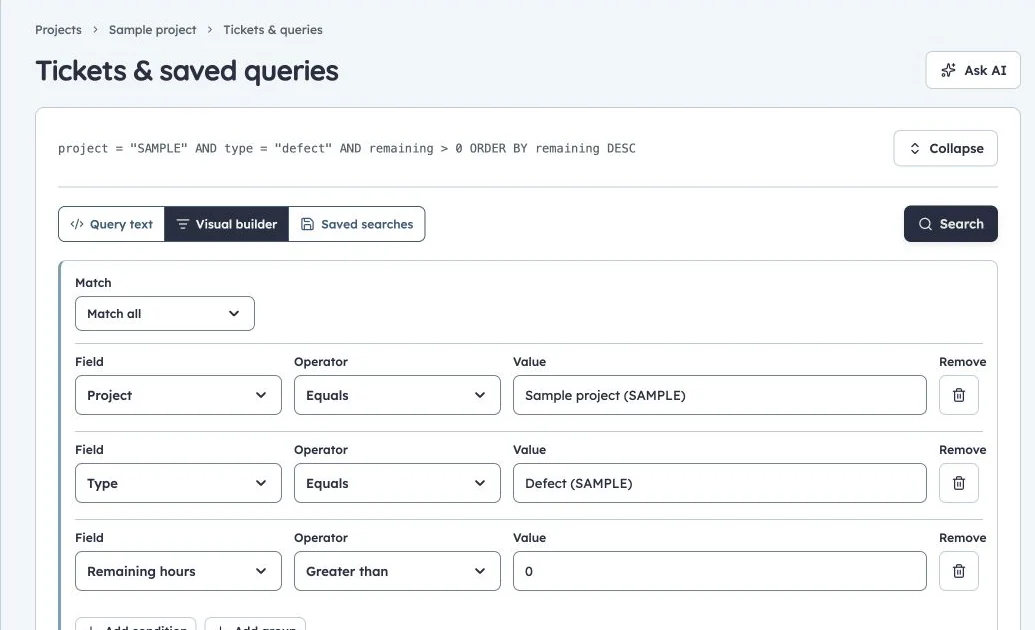
Visual query builder
Production query example: SAMPLE defects with remaining hours, using the shared visual/text query model.
Build filters visually
Choose a Field, Operator and Value. Add conditions beneath a group; use Match all for AND and Match any for OR. Nest groups when either of two cases may satisfy part of a larger rule. Remove unwanted conditions explicitly.
Guided values offer accessible people, projects, types, priorities and published statuses. Search choices, select Current user or Empty where appropriate, and use multiple values with IN/NOT IN. Manual entry remains available for historical or unlisted values. IDs/keys are stored even when labels show readable names.
Sorting is separate: add and order up to three fields, each ascending or descending. Open Query preview to inspect generated text. The visual/text editors share the same model; syntax errors keep text mode open so the query can be corrected.
Query language reference
This is a bounded JQL-like subset, not full Jira JQL or SQL. Field names are case insensitive. Use quoted strings for spaces; escape quotes with a backslash. AND binds more tightly than OR; parentheses make grouping explicit.
| Syntax | Meaning |
|---|---|
=, != |
Equality and inequality |
>, <, >=, <= |
Comparisons where supported by the field |
~ |
Contains matching |
IN (...), NOT IN (...) |
Membership in a list |
currentUser() |
The current viewer's user ID |
EMPTY |
An empty field value |
now() |
Current time |
-7d, -24h, -2w |
Relative timestamp values |
ORDER BY field ASC, other DESC |
Up to three ordered sort clauses |
Supported built-in fields: project, key, title, type, execution_mode, status, assignee, reporter, priority, sprint, release, release_note, parent, points, hours, remaining, created, updated, due, rank. Project custom fields use custom.<field-id> and their supported typed semantics.
Use actual stored stage IDs, type IDs, user IDs and release/sprint IDs where those fields require them. The visual builder helps choose correct values; a display label is not always its stored identifier. Workflow UTC-relative date rules use a different notation from query timestamps; see workflow rules.
Harbor examples
Unfinished SAMPLE work with the default sample status identifiers:
project = "SAMPLE" AND status != "done" ORDER BY rank ASC
Your assigned work, or unassigned work:
project = "SAMPLE" AND (assignee = currentUser() OR assignee = EMPTY) ORDER BY priority DESC, updated DESC
Defects with remaining effort:
project = "SAMPLE" AND type = "defect" AND remaining > 0 ORDER BY remaining DESC
Recently updated work:
project = "SAMPLE" AND updated >= -7d ORDER BY updated DESC
A status != "done" condition excludes only that status ID; projects with several Done stages need a filter covering those IDs. Sorting priority uses stored query behavior, not an assumed custom severity ordering.
Save and share
Enter a query name and choose personal or permitted project sharing, then Save. Shared queries still resolve currentUser() for each viewer and apply their access.
In Saved searches, Open loads the current saved definition, runs it and collapses the panel. Owners may Edit/Delete; other users can save a personal copy where offered. Favourite useful searches to show them under Tickets & queries in the sidebar. Saving an edited record requires its current version.
Results paginate; a page is not the total search. Dashboard charts aggregate the full eligible source set. If a guided-choice load fails, retry or use manual values; do not substitute a broader query to hide an unavailable source.