
Workflow AI and automation
Configure bounded action chains, approvals and run recovery alongside workflow transitions.
On this page
On this page
Distinguish rules from actions
Transition rules answer “May this ticket move?” Automation chains answer “What configured steps should run after an event or manual request?” They appear on the workflow canvas but have different purposes. An action never bypasses a transition guard.
Managers edit automation in a workflow draft. Project/site enablement and a published enabled chain are required for unattended execution. Merely changing a ticket to Agent mode or drawing a connector does not start a run.
Choose a trigger
Triggers include ticket creation, stage entry, configured field changes, blockers resolved and manual initiation. Choose the narrow event needed for the process. A manual refinement chain is useful when testing; a stage-entry chain is useful for a consistent review handoff.
Bind chains to the intended workflow and tickets. A blockers-resolved trigger does not mean the blocker can never reopen; related state is checked again before unfinished work applies.
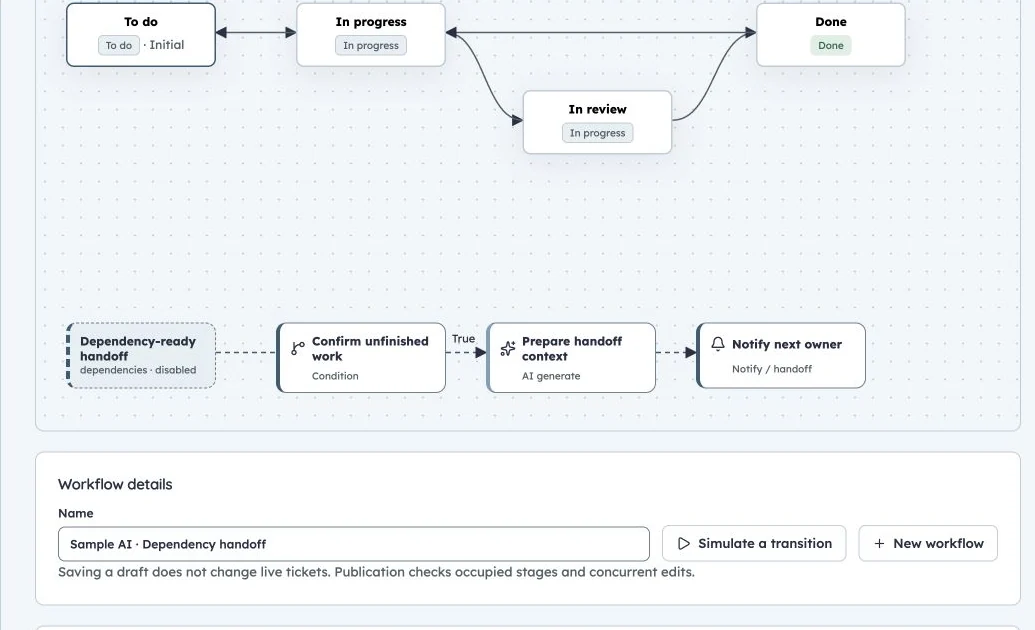
Dependency handoff workflow
Production SAMPLE dependency-handoff configuration. The chain remains disabled; this view does not execute AI.
Configure actions
| Node | Purpose and review considerations |
|---|---|
| AI generate | Choose task preset, prompt, bounded context and allowed model; create a validated artifact/proposal |
| Condition | Evaluate nested typed conditions; follow the configured true/false successor |
| Approval | Pause for a configured eligible project manager to review the proposal |
| Update fields | Apply configured values within permissions and execution-mode safeguards |
| Transition | Attempt a permitted workflow transition with the same guards as manual moves |
| Create from template | Expand a pinned published work template with mapped parameters/assignees/root |
| Request review | Create the configured lightweight ticket review request |
| Notify/handoff | Deliver the configured handoff to eligible recipients through existing notification behavior |
Select a node for configuration. Drag its position or edit coordinates. Use the prior-output picker to reference upstream outputs rather than guessing field names. For example:
{{steps.refine.description}}
{{steps.refine.acceptance}}
The actual node ID must exist earlier on that path, and its output must support that property. A summary preset has a different output shape from a ticket draft. Forward references are rejected. An empty model selection uses the site default resolved when the run starts.
Chains are sequential and limited to 20 nodes. Arbitrary scripts, cycles, joins and external-agent tools are not supported. Validate successors and condition branches before publication.
Understand execution modes
Ticket type describes the kind of work; execution mode describes AI application safeguards.
| Mode | Generated output behavior |
|---|---|
| Human | Generated edits require review before unattended application |
| AI-assisted | Generated edits require review before unattended application |
| Agent | Only configured text/field outputs can apply without that implicit review |
Generated status, owner, hierarchy, sprint and release changes always require approval. An explicit Approval node still applies in Agent mode. Explicit approval nodes require an eligible project manager; implicit generated-change approval may be handled by an eligible assignee or manager.
Mode does not grant permissions. Steps operate within the current rights of the published configuration's publisher. The initiating user, publisher, content author and automation identity are distinct actors.
Simulate and publish
Select an accessible real ticket when simulating conditions involving relationships. Inspect paths, node configuration and proposed dependencies. Simulation does not perform inference or commit ticket edits; label its results accordingly.
Publishing validates enabled capabilities, references, reviewers, assignees and node structure. Draft changes do not alter published behavior or running jobs. Runs use frozen published snapshots; work templates are pinned to reviewed versions.
Review and recover a run
Open Project settings → Automation runs or ticket Automation activity. Inspect steps, proposals, artifacts, approvals and errors. States include queued, running, awaiting approval, paused, budget-blocked, failed, completed and cancelled.
An approval binds the proposal, ticket version and related activity revision. A comment, review, link or edit can make it stale. Request a fresh proposal and review again; approval is not a reusable authorization for changed content.
Managers can pause/resume, retry or cancel where offered. Retry prepares fresh work while retaining already committed actions. Cancellation stops further work but does not undo created tickets or field edits. Budget-blocked work can recover after the configured daily reset or an explicit retry; inspect limits first.
Limits and safety boundaries
Runs and action counts are bounded, with persisted deduplication and recovery. Current publisher permissions, related blockers, workflow/sprint rules and source freshness are rechecked before mutations. Automated writes do not recursively trigger their own chain without bound.
Restored automation configuration is disabled; transient events/runs are not replayed by backup restoration. Do not use restore as a way to rerun historical automation. See templates and worked examples for building repeatable delivery.